I want to build a six axis robotic arm, and every joint needs a motor I can position precisely and read back. I picked the MKS SERVO42ES: a NEMA17 stepper with a closed loop driver on the back, a magnetic encoder, FOC control and a CAN port, so all six joints can share one bus.
Makerbase publishes a GitHub repository for the motor. It holds three PDF manuals, for CAN, RS485 and Modbus, and the folders called Example Code and Hardware contain nothing but placeholders. So before building an arm I built one joint: an ESP32-S3 that talks to the motor over CAN and serves a control page to any browser on my WiFi. This post covers what it took, including the places where the manual and the motor disagree.
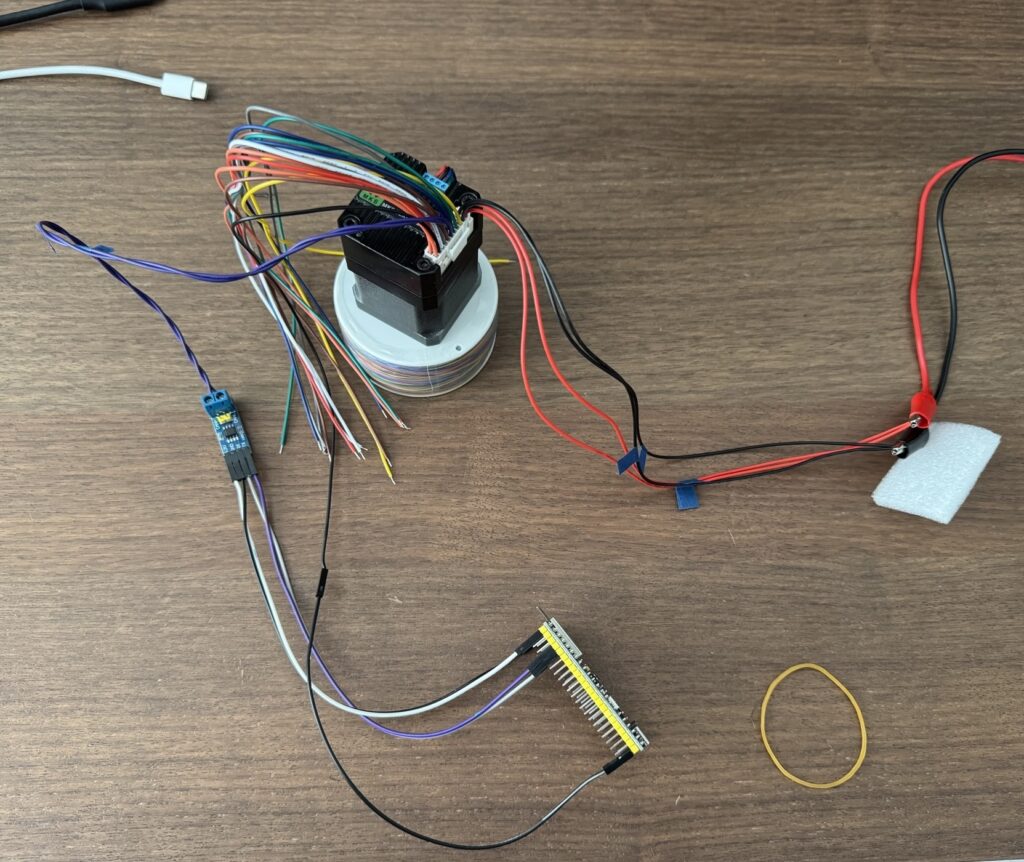
The hardware
| Part | What it does |
| MKS SERVO42ES, CAN version | |
| ESP32-S3 dev board (N16R8) | |
| SN65HVD230 module | CAN transceiver. It runs at 3.3 V, so it wires straight to the ESP32. |
| Lab power supply | 24 V for the motor. |
The SERVO42ES is easy to confuse with the SERVO42E. Makerbase sells both, they use different protocols, and their manuals are not interchangeable.
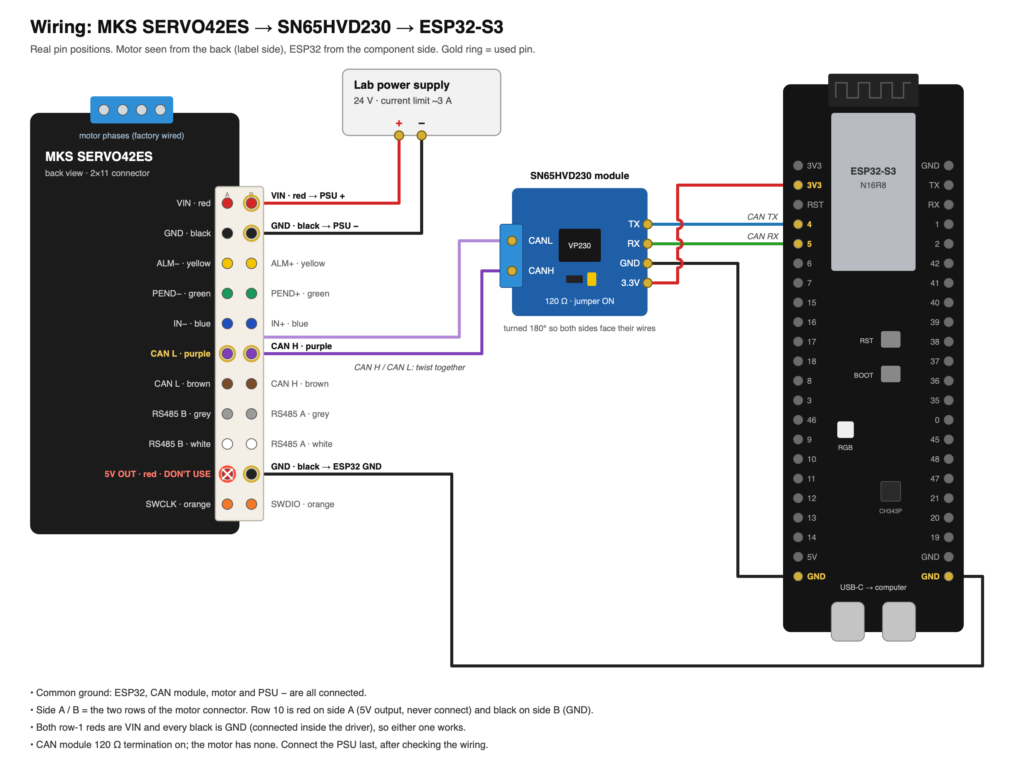
The ESP32 drives the transceiver from GPIO 4 and 5, and the transceiver’s CANH and CANL go to the motor. The motor and the ESP32 share a ground.
The manual versus the motor
The protocol itself is small. Each frame uses a standard 11 bit CAN ID, which is the motor’s address (1 by default), followed by a command code, its payload and a checksum. The checksum is the ID plus every byte, keeping the low eight bits:
uint8_t checksum(uint16_t id, const uint8_t *data, uint8_t len) {
  uint32_t sum = id & 0xFF;  // how IDs above 0xFF enter the sum is undocumented
  for (uint8_t i = 0; i < len; i++) sum += data[i];
  return sum & 0xFF;
}
My first sketch only read. It asked for the firmware version and the encoder position and printed whatever came back:
TX id=0x001 dlc=2 : 40 41
RX id=0x001 dlc=6 : 40 92 01 00 01 D5
   version: E series, hardware 2, cal 1, firmware V1.0.1
TX id=0x001 dlc=2 : 31 32
RX id=0x001 dlc=8 : 31 00 00 00 00 00 03 35
   position: 3 counts = 0.07 deg
The position reply matched the example in the manual byte for byte, and the version reply showed the motor runs the same firmware, V1.0.1, that the manual documents. Most of the manual held up after that. These parts did not:
| The manual says | What my motor did |
| The factory default mode is 03, pulse and direction. | It arrived in mode 05, bus closed loop, already set up for CAN. |
| Direction is “CCW/CW” in one place and “forward/reverse” in another, and the encoder section contradicts its own example. | A positive move turns the shaft anticlockwise, seen from the shaft end, and the encoder count goes up. |
| The emergency stop command replies 1 on success. | On a motor at rest it replies with a failure code, although the motor stays enabled and holds its position. |
| Example frames | One synchronisation example ends in 62 where the checksum works out to 61, and two examples are longer than the 8 bytes a CAN frame can carry. |
Two limits matter once there is a gearbox. Position moves take a signed 24 bit target, which is about 512 motor turns either side of zero, while the position readout is 48 bits wide. At a 30:1 ratio that still leaves 17 joint turns each way. Speeds go in whole RPM, and the acceleration byte sets how often the speed steps by 1 RPM, once every (256 - acc) × 50 µs. The gentlest ramp the motor accepts is about 78 RPM per second.
A cable with 22 wires and no labels
Apart from the motor phases, everything goes through one 2×11 connector: power, CAN (twice, in parallel), RS485 (also twice), the alarm and in position outputs, a limit switch input, a 5 V output and the debug pins. The manual gives this pinout only as a drawing on page 7, so searching the PDF’s text finds nothing.
The cable that comes with the motor makes it harder. Both rows use the same eleven colours in the same order, so every colour appears twice among the loose ends. Row 10 is the exception: its wire is red on one side and black on the other. That matches the drawing, where row 10 is the 5 V output on one side and ground on the other, and it gave me the orientation. It also meant there are three red wires. Two are the 24 V input, and the third is a 5 V output that would not survive meeting 24 V.
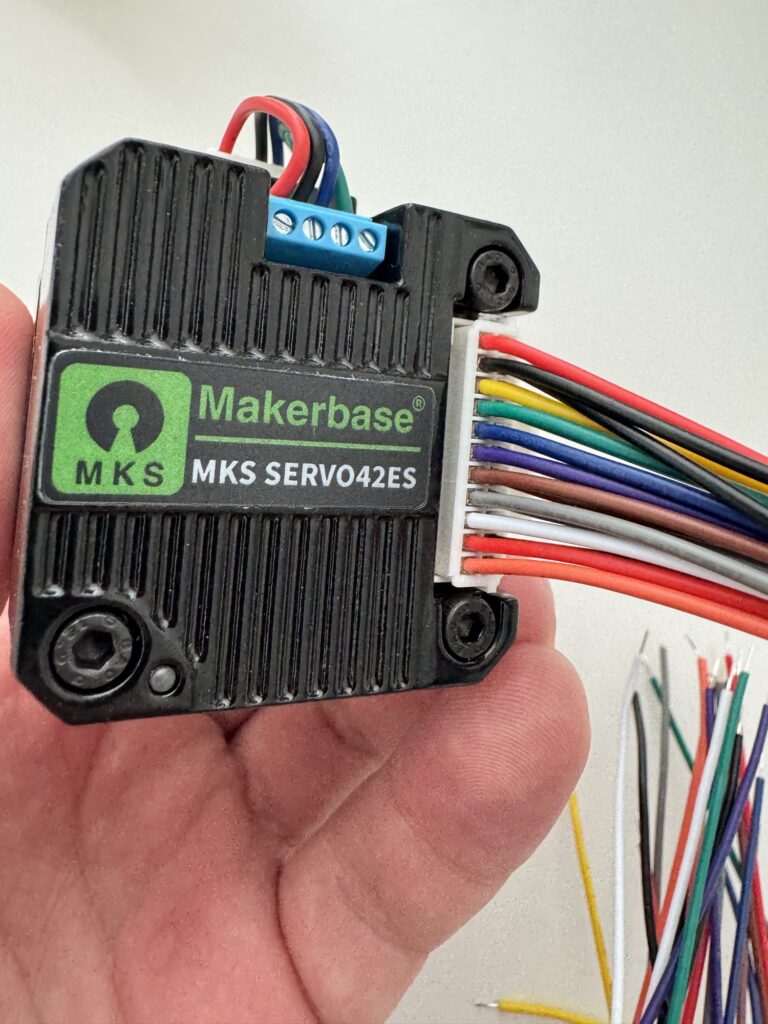
I tagged the wires I needed and checked them with a multimeter before powering anything. The two 24 V reds beeped together, because the driver connects them internally. CAN H beeped to the brown wire on the same side, because the two CAN rows are in parallel. CAN H to CAN L read about 30 kΩ, which means the motor has no termination resistor of its own.
The SN65HVD230 module has a 120 Ω resistor on a jumper, and one terminator is enough for a short bench cable. The arm will have a longer bus with six motors, so its far end will need a second resistor. The spare brown pair on the last motor is a convenient place for it.
The firmware
The firmware is an Arduino sketch, and it needs nothing beyond Espressif’s board package. The web server comes from ESP-IDF, and its WebSocket support is already compiled into the Arduino core (CONFIG_HTTPD_WS_SUPPORT=y). Anyone who clones the repository can build it without hunting for matching library versions.
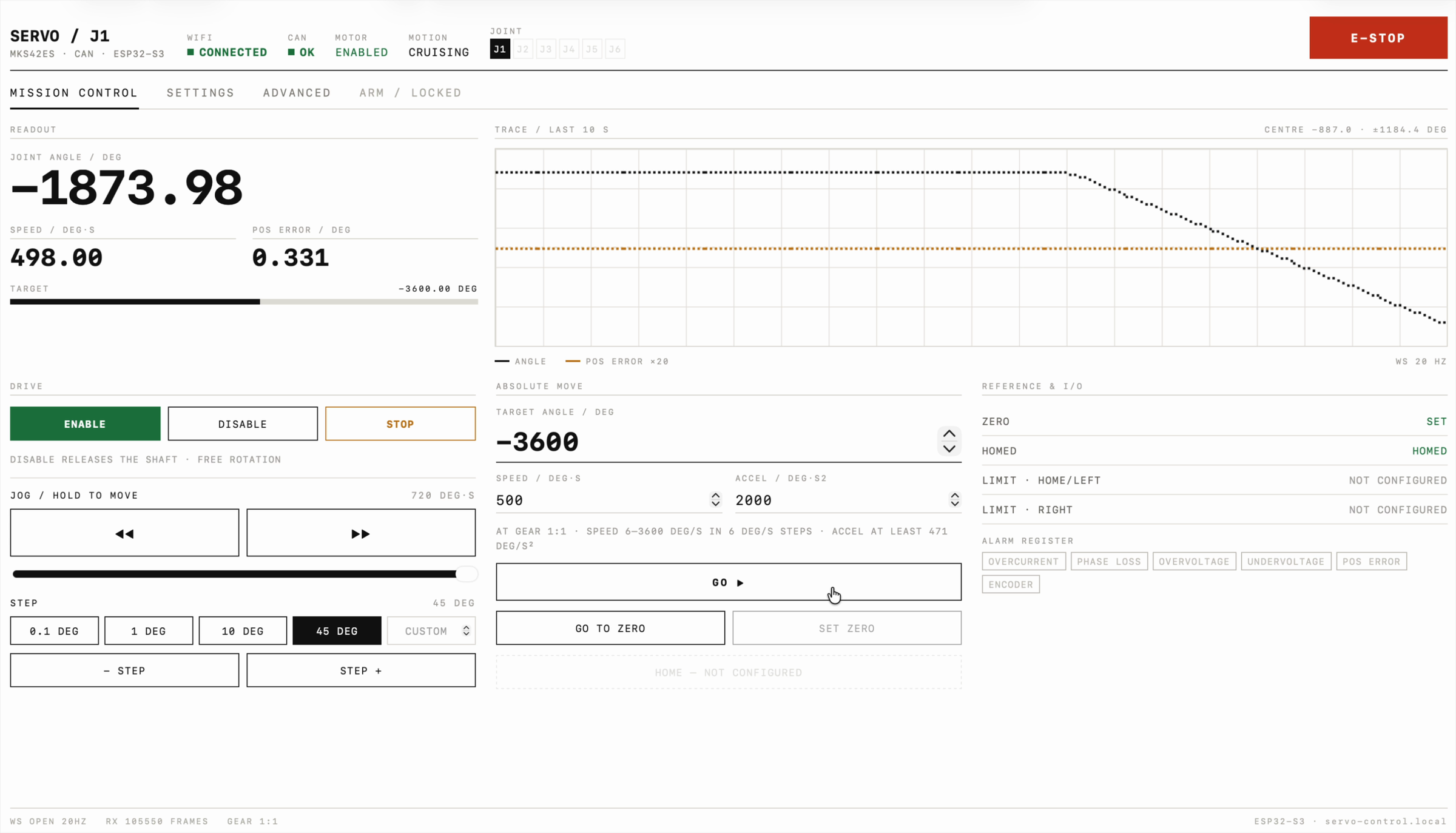
The ESP32 sends the motor about 100 requests a second. Every other one reads the position, so position updates at 50 Hz, and speed, position error, run state, enable, stall, alarm and homing status share the remaining slots. The ESP32 pushes all of it to the browser over a WebSocket at 20 Hz. On my network I measured 20.3 messages a second.
The page is a single HTML file with inline CSS and JavaScript and no framework. I designed the interface first as a static mockup and then ported it. Gzipped, the 40 KB source goes over the air as about 12 KB. The page lives at http://servo-control.local, announced over mDNS on my home network.
The UI works in joint degrees. I enter the gearbox ratio on the settings page, and the firmware converts it to encoder counts, 16384 per motor turn, which also keeps moves independent of the driver’s microstepping. The gear ratio and direction are stored on the ESP32. Run current, stall protection and the link loss timeout are written to the motor and saved in its own memory. A maintenance tab restarts the motor, runs the encoder calibration, and switches the control mode back if a factory reset ever changes it.
Stopping safely
In the arm, this motor will hold up every joint above it, and several decisions in the firmware come from that.
E-STOP sends the motor’s emergency stop and latches, and the motor stays enabled and holds its position, because releasing the shaft would drop the arm. Motion stays blocked until I release the latch. The Esc key triggers it as well.
Jog is hold to move. While a jog button is pressed, the page repeats the command every 100 ms, and the ESP32 stops the motor after 300 ms without one. That covers a WiFi dropout, a closed tab, and a mouse button that gets released outside the browser window.
The motor has its own heartbeat setting: it stops if it hears nothing for a set time. The ESP32 sets it to one second. Normal polling keeps it satisfied, so it only fires if the ESP32 hangs or loses power.
Every move is capped at 600 motor RPM for now, and the firmware refuses motion unless the motor is online, enabled, in bus mode, not stalled and not stopped by E-STOP.
Two problems that took longer than they should have
Five seconds per page load
From my Mac the page took five seconds to open, every time. Forcing IPv4, the same request took 0.08 s. macOS asked the ESP32 for an IPv6 address as well as an IPv4 one, the ESP32 never answered the IPv6 question, and macOS waited five seconds before giving up. One line in the firmware, WiFi.enableIPv6(), makes the ESP32 answer both, and the lookup dropped from 5.0 s to 0.005 s.
The stall test that reset the motor
To test stall protection I held the shaft by hand during a move. The motor waited, then stopped, and the joint angle jumped to zero at the point where it stopped. Stall protection should release the shaft and set a stall flag, and the flag was clear. The position counter had started again from zero, which is what happens when the driver restarts.
The constant current light on my lab supply explained it. The current limit was set to 1.5 A, and with the shaft blocked the driver wanted more. The supply held the current at its limit by dropping the voltage, which fell to about 8 V, far below the driver’s 20 V minimum, so the driver browned out and rebooted. With the limit at 3 A, the same test tripped stall protection properly.
It also showed a gap in my firmware. A motor restart went unnoticed, and a restart silently throws away the zero. The ESP32 now watches for it. Position is sampled every 20 ms, and at its 3000 RPM maximum the motor can move at most about 820 counts in that time, so a jump of more than 3000 counts means the counter was reset. Setting zero does that on purpose and the firmware expects it. Any other jump makes the page say the motor restarted and that the zero is gone. For the arm, the supply has to be sized for every joint stalling or accelerating at once.
What is not done yet
The motor supports homing with a switch, homing against a hard stop and single turn homing, but I don’t have a limit switch fitted yet, so homing and the limit settings are still to come. Only one motor is on the bus so far. Firmware updates still go over USB, which will be annoying once the ESP32 is inside the arm. I also haven’t tried the factory reset button on the real motor.
The code
Everything is on GitHub under the MIT licence: the firmware, the web UI, the wiring diagram, and a protocol reference that lists every place the manual was wrong.
Leave a Reply